
Lucid Dreaming Awakener Headband: A Prototype Built from Amazon Parts
October 7th, 2026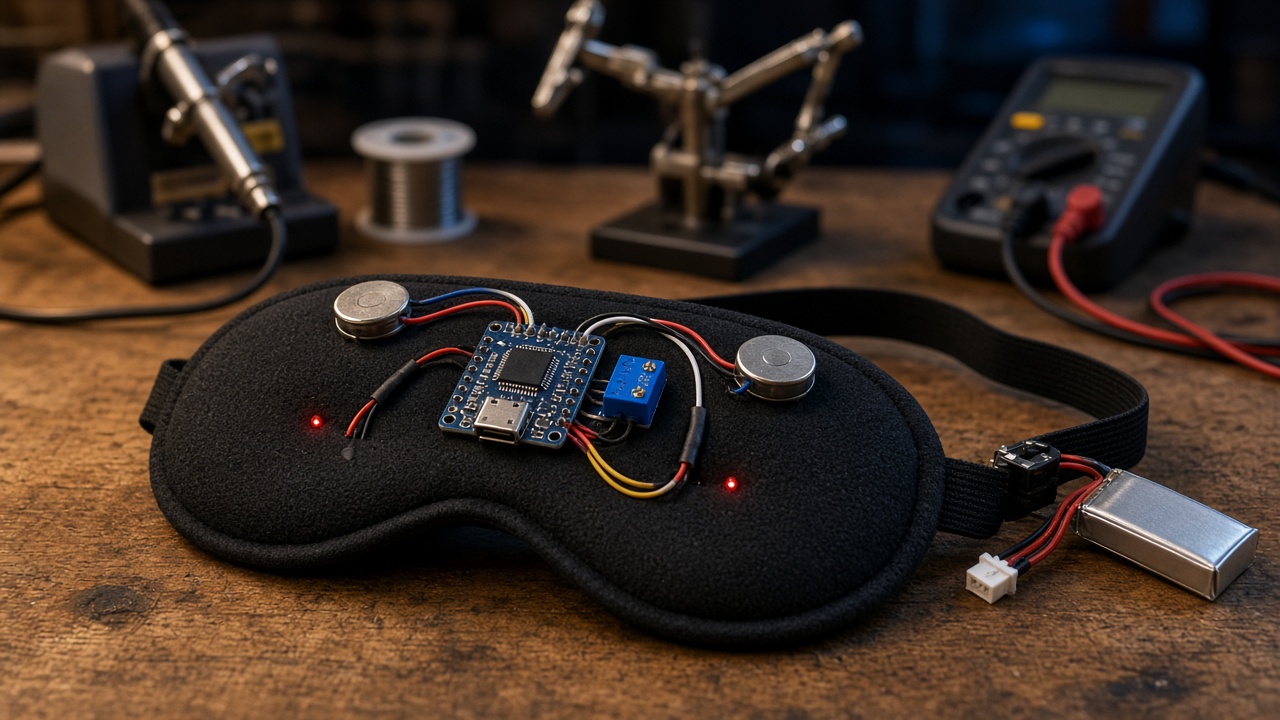
As an Amazon Associate I earn from qualifying purchases.
Goal: become aware I'm dreaming while I'm dreaming. Without waking up.
The idea isn't new. Back in the '80s and '90s Stephen LaBerge's DreamLight and NovaDreamer masks flashed lights at sleepers during REM sleep, hoping the light would show up inside the dream as a clue. Labs are still poking at the same idea with sounds and lights today.
I don't have a sleep lab. I have a soldering iron, an Amazon account, and a habit of learning by doing. So I built one.
Fair warning: this is a prototype. It's a hobby experiment, not a medical device, and I'm not promising it'll give anyone lucid dreams. Fail fast, iterate.
What it does
- Waits. REM periods get longer in the second half of the night, so it does nothing for the first ~4.5 hours after I switch it on.
- Watches. An accelerometer on the mask tracks head movement. When I've been still for 10+ minutes, it treats that as "maybe REM." That's a rough guess, because deep sleep is still too. Real eye-movement sensing is on the next-steps list.
- Cues. Two red LEDs slowly breathe at very low brightness behind the mask, then the coin motor buzzes twice. The idea is something like "hey... this is a dream" without an alarm clock jolt.
- Backs off. It waits 20 minutes between cues and stops after 6 per night. If I move a lot right after a cue (I probably woke up), the next cue is dimmer.
The other half is mental. During the day I train myself so that seeing a red glow or feeling a buzz means "do a reality check." The device just delivers the cue. The habit is what does the work.
Bill of Materials
I picked parts that are sold on both Amazon.com and Amazon.ca. Most come in multi-packs, so you'll have spares for the next version (there will be a next version).
- 1 × Seeed Studio XIAO ESP32C3 (paid link): The brain. Thumb-sized, USB-C, and it has a LiPo charger built in, so no separate charging board.
- 1 (use 1) × HiLetgo GY-521 MPU-6050 accelerometer/gyro (3-pack) (paid link): Senses head movement. Long stillness is my (rough) proxy for "maybe REM."
- 1 (use 1) × 10x2.7mm 3V coin vibration motors (5-pack) (paid link): The gentle buzz cue. Sits against the temple.
- 1 (use 2) × Chanzon 3mm red diffused LEDs (100-pack) (paid link): Light cue, one per eye. Diffused red and driven dim.
- 1 (use 1x 2N2222) × BOJACK NPN/PNP transistor assortment (includes 2N2222) (paid link): Switches the motor so the ESP32 pin doesn't have to.
- 1 (use 1) × 1N4148 switching diodes (130-pack) (paid link): Flyback diode across the motor.
- 1 (use 3x 1k) × BOJACK 1/4W resistor kit (25 values) (paid link): 1k for the transistor base and 1k per LED.
- 1 × 3.7V 500mAh 503035 LiPo with JST PH2.0 (paid link): Power. Soldered to the XIAO's battery pads through the switch.
- 1 (use 1) × HiLetgo SS-12D00 mini slide switches (20-pack) (paid link): Hard power switch on the battery lead.
- 1 × LitBear contoured sleep mask (paid link): The "headband." Contoured cups leave room for LEDs and wiring.
- 1 × BNTECHGO 30 AWG silicone wire, red/black (paid link): Thin and floppy, which is what you want on a face.
Buy all components on Amazon (paid link)
Adds the 11 parts above (not the tools) to your Amazon cart. Amazon may ask you to sign in first.
You'll also need a USB-C data cable to program the XIAO, plus some tape or felt to cover the electronics inside the mask.
Tools Required
- YIHUA 926 III soldering station (includes 2 helping hands) (paid link): Temperature-controlled. Comes with two helping hands.
- SainSmart 63/37 rosin-core solder, 0.8mm (paid link): Leaded 63/37 flows easily. Wash your hands after.
- Chip Quik CQ4LF no-clean flux pen (paid link): Makes the tiny XIAO battery pads much easier.
- Klein Tools 11057 wire stripper (20-30 AWG) (paid link): Rated down to 30 AWG, so it strips the thin silicone wire cleanly.
- IGAN-170 precision flush cutters (paid link): Trims leads flush.
- AORAEM helping hands with magnifier (paid link): Optional if your iron kit already has some.
- AstroAI DM130B digital multimeter (paid link): Continuity checks and battery voltage.
- ASHINER heat shrink tubing kit (580 pcs) (paid link): Insulate every joint. Nothing bare near skin.
- Amazon Basics hot glue gun kit with 30 glue sticks (paid link): Strain relief and potting components into the mask.
You can also shrink the heat shrink with a heat gun or lighter if that's what you have. Be careful with a lighter near LiPo wiring.
The circuit
It's simple on purpose. Everything runs off the XIAO's 3.3V rail.
- MPU-6050: VCC → 3V3, GND → GND, SDA → D4, SCL → D5.
- LEDs: D2 → 1k resistor → LED (left) → GND. D3 → 1k resistor → LED (right) → GND. With 1k at 3.3V, a red LED gets only a milliamp or two even at full PWM, and the code runs it much lower than that.
- Motor: D1 → 1k resistor → 2N2222 base. Emitter → GND. Collector → motor (−). Motor (+) → 3V3. 1N4148 across the motor with the striped end (cathode) to 3V3. That's the flyback diode, so the motor's voltage spike doesn't hit the transistor.
- Power: LiPo red → slide switch → BAT+ pad on the bottom of the XIAO. LiPo black → BAT− pad. Charge through the XIAO's USB-C, with the switch on so the battery is connected. Check polarity with the multimeter before you solder. Reversed LiPo = dead board.
I stayed off D0, D8, and D9 on purpose. Those are ESP32-C3 strapping pins, and hanging things off them can cause weird boot problems.
Build steps
- Breadboard it first. Flash the sketch with
TEST_MODE = trueand confirm the LEDs breathe, the motor buzzes, and the Serial Monitor shows motion numbers jumping when you shake the MPU-6050. - Prep the XIAO. Flux the battery pads, tin them, and solder the battery leads through the switch. Heat shrink everything.
- Wire the sensor and outputs with 30 AWG silicone wire. Leave slack, because the mask flexes and stiff wire will snap at the joint.
- Place the LEDs in the mask's eye cups, pointing at the cup and not straight at your eyes. Diffused light through closed eyelids is the goal. Cover them with a thin layer of hot glue or felt so nothing hard touches your face.
- Place the motor on the strap near the temple, against the fabric and not the bone.
- Mount the XIAO, sensor, and battery on the back strap, away from your face. The MPU-6050 should be firmly attached so it actually moves with your head.
- Strain relief. Put a dab of hot glue where every wire leaves a joint. Cover all exposed metal with heat shrink or glue.
- Continuity check with the multimeter: no shorts between BAT+ and BAT−, or between 3V3 and GND.
The code
Arduino IDE with the Espressif ESP32 board package, board set to XIAO_ESP32C3. There are no extra libraries. It talks to the MPU-6050 directly over I2C. I compiled it against the ESP32 Arduino core 3.3.x.
// Lucid Dreaming Awakener Headband - prototype v0.1
// Board: Seeed Studio XIAO ESP32C3 (Arduino-ESP32 core)
// Sensor: MPU-6050 (GY-521) on I2C. Outputs: 2 red LEDs + 1 coin vibration motor.
// This is a hobby experiment, NOT a medical device.

#include <Wire.h>

// ---------- Pins (XIAO ESP32C3) ----------
const int PIN_MOTOR = D1;   // -> 1k resistor -> 2N2222 base
const int PIN_LED_L = D2;   // -> 1k resistor -> red LED (left)
const int PIN_LED_R = D3;   // -> 1k resistor -> red LED (right)
// I2C: SDA = D4, SCL = D5 (board defaults)

// ---------- Tuning ----------
// Set TEST_MODE to true to shrink every timer so you can watch it work at your desk.
const bool TEST_MODE = false;

const uint32_t MIN_MS = 60UL * 1000UL;
const uint32_t START_DELAY_MS = TEST_MODE ? 20UL * 1000UL : 270UL * MIN_MS; // ~4.5 h after power-on
const uint32_t STILL_NEEDED_MS = TEST_MODE ? 15UL * 1000UL : 10UL * MIN_MS;  // still this long before a cue
const uint32_t COOLDOWN_MS     = TEST_MODE ? 30UL * 1000UL : 20UL * MIN_MS;  // gap between cues
const int      MAX_CUES        = 6;      // per night
const int      LED_MAX         = 12;     // 0-255 PWM. Keep it LOW. Eyelids are thin.
const float    MOVE_THRESHOLD  = 0.06f;  // g. Above this = "moving". Tune with Serial output.

// ---------- MPU-6050 (raw registers, no extra library) ----------
const uint8_t MPU_ADDR = 0x68;

void mpuWrite(uint8_t reg, uint8_t val) {
  Wire.beginTransmission(MPU_ADDR);
  Wire.write(reg);
  Wire.write(val);
  Wire.endTransmission();
}

bool mpuReadAccel(float &ax, float &ay, float &az) {
  Wire.beginTransmission(MPU_ADDR);
  Wire.write(0x3B);                       // ACCEL_XOUT_H
  if (Wire.endTransmission(false) != 0) return false;
  if (Wire.requestFrom(MPU_ADDR, (uint8_t)6) != 6) return false;
  int16_t x = (Wire.read() << 8) | Wire.read();
  int16_t y = (Wire.read() << 8) | Wire.read();
  int16_t z = (Wire.read() << 8) | Wire.read();
  ax = x / 16384.0f; ay = y / 16384.0f; az = z / 16384.0f;  // +/-2g range
  return true;
}

// ---------- Cue patterns ----------
void ledsOff() { analogWrite(PIN_LED_L, 0); analogWrite(PIN_LED_R, 0); }

void lightCue(int level) {
  // 5 slow "breaths", alternating eyes, brightness capped at 'level'
  for (int rep = 0; rep < 5; rep++) {
    for (int b = 0; b <= level; b++) { analogWrite(rep % 2 ? PIN_LED_L : PIN_LED_R, b); delay(40); }
    for (int b = level; b >= 0; b--) { analogWrite(rep % 2 ? PIN_LED_L : PIN_LED_R, b); delay(40); }
    delay(300);
  }
  ledsOff();
}

void buzzCue(int pulses) {
  for (int i = 0; i < pulses; i++) {
    digitalWrite(PIN_MOTOR, HIGH); delay(120);
    digitalWrite(PIN_MOTOR, LOW);  delay(380);
  }
}

// ---------- State ----------
float avgX = 0, avgY = 0, avgZ = 1;       // slow-moving average of the gravity vector
uint32_t bootMs, stillSinceMs, lastCueMs = 0;
int cuesGiven = 0;
int ledLevel = LED_MAX;

void setup() {
  Serial.begin(115200);
  setCpuFrequencyMhz(80);                 // save battery, we don't need speed
  pinMode(PIN_MOTOR, OUTPUT); digitalWrite(PIN_MOTOR, LOW);
  pinMode(PIN_LED_L, OUTPUT); pinMode(PIN_LED_R, OUTPUT); ledsOff();

  Wire.begin();
  mpuWrite(0x6B, 0x00);                   // wake MPU-6050
  mpuWrite(0x1C, 0x00);                   // accel +/-2g
  mpuWrite(0x1A, 0x05);                   // digital low-pass filter (~10 Hz)

  // "I'm alive" blink + buzz so you know it booted before you lie down
  lightCue(LED_MAX); buzzCue(1);
  bootMs = stillSinceMs = millis();
}

void loop() {
  static uint32_t lastSample = 0;
  if (millis() - lastSample < 100) return; // 10 Hz
  lastSample = millis();

  float ax, ay, az;
  if (!mpuReadAccel(ax, ay, az)) return;

  // Movement = how far this sample is from the slow average
  float dx = ax - avgX, dy = ay - avgY, dz = az - avgZ;
  float motion = sqrtf(dx * dx + dy * dy + dz * dz);
  avgX += 0.02f * dx; avgY += 0.02f * dy; avgZ += 0.02f * dz;

  uint32_t now = millis();
  if (motion > MOVE_THRESHOLD) stillSinceMs = now;

  static uint32_t lastPrint = 0;
  if (now - lastPrint > 1000) {
    lastPrint = now;
    Serial.printf("t=%lus motion=%.3f still=%lus cues=%d\n",
                  (now - bootMs) / 1000, motion, (now - stillSinceMs) / 1000, cuesGiven);
  }

  bool armed      = (now - bootMs) > START_DELAY_MS;
  bool stillLong  = (now - stillSinceMs) > STILL_NEEDED_MS;
  bool cooledDown = lastCueMs == 0 || (now - lastCueMs) > COOLDOWN_MS;

  if (armed && stillLong && cooledDown && cuesGiven < MAX_CUES) {
    Serial.println("CUE");
    lightCue(ledLevel);
    buzzCue(2);
    cuesGiven++;
    lastCueMs = now;

    // If I move a lot right after a cue, it probably woke me up: back the light off next time.
    uint32_t watchStart = millis();
    bool bigMove = false;
    while (millis() - watchStart < 5000) {
      if (mpuReadAccel(ax, ay, az)) {
        float m = sqrtf(sq(ax - avgX) + sq(ay - avgY) + sq(az - avgZ));
        if (m > MOVE_THRESHOLD * 4) bigMove = true;
      }
      delay(100);
    }
    if (bigMove && ledLevel > 3) ledLevel -= 3;
    stillSinceMs = millis();
  }
}
Testing and tuning
- Desk test first.
TEST_MODE = trueshrinks every timer to seconds. Watch the Serial Monitor: motion should sit near zero when it's flat on the desk and spike when you move it. - MOVE_THRESHOLD: Wear it lying down awake for a few minutes and watch the motion values. Breathing and heartbeat cause tiny movement. Set the threshold just above that noise floor.
- LED_MAX: Start at the default of 12 out of 255. Lie down, close your eyes, and trigger a cue. You want barely noticeable. If it's obvious with your eyes closed, it's probably too bright to sleep through.
- Motor: If two pulses wake you up, drop to one or shorten the pulse. If you never notice it, move it closer to the temple before you make it stronger.
- Keep a dream journal. Write down whether you remember a red glow or a buzz in a dream, whether it woke you, and whether you became lucid. One person's journal isn't science, but it's how you tune.
- Battery: With Wi-Fi off and the CPU at 80 MHz, the ESP32-C3 sips power, but measure it yourself. Charge it fully and check the voltage in the morning with the multimeter.
Safety
- Not a medical device. Not for diagnosing or treating anything. If you have a sleep disorder, talk to a doctor, not a soldering iron.
- Low light near eyes. Keep LED brightness low and use diffused LEDs aimed away from your eyes. The cue is a slow breathing glow, not rapid flashing. If you have any history of seizures or photosensitivity, skip the light cue entirely.
- LiPo batteries deserve respect. Don't puncture, bend, or crush the cell. Don't charge unattended, and don't sleep with it plugged in. Insulate every joint. Before you buy, make sure the cell has a protection circuit, or add one. If it ever puffs up, gets hot, or smells funny, stop using it and dispose of it properly.
- No bare metal on skin. Everything gets heat shrink, glue, or fabric over it.
- Stop if it bothers you. Discomfort, headaches, worse sleep, or feeling groggy the next day: turn it off. Sleep matters more than lucid dreams.
- Leaded solder: Work with ventilation and wash your hands.
Next steps
- Real eye-movement sensing. Rapid eye movements are what put the "REM" in REM. Small IR reflectance sensors at the eyelid, or EOG electrodes, would be a big step up from "you've been still a while."
- Audio cue. Add a tiny piezo or bone-conduction transducer for a soft tone option.
- Phone config over BLE. The ESP32-C3 has Bluetooth, so I could set thresholds and brightness from my phone instead of reflashing.
- Logging. Save motion and cue times to flash, then line them up with my dream journal in the morning.
- Deep sleep between samples for much better battery life.
- A 3D-printed enclosure for the electronics on the back strap.
I'll post updates as I iterate. If you build one, tell me what worked and what woke you up.
Posted In:
ABOUT THE AUTHOR:Software Developer always striving to be better. Learn from others' mistakes, learn by doing, fail fast, maximize productivity, and really think hard about good defaults. Computer developers have the power to add an entire infinite dimension with a single Int (or maybe BigInt). The least we can do with that power is be creative.


 Subscriptions:
 Whole Mars